Taking your first proctored exam can feel a little unfamiliar, especially if you have never completed an online exam with remote monitoring before. You may have questions about how the process works, what you need to prepare, whether someone will be watching you, or what happens if you experience a technical issue.
The good news is that preparing for a proctored exam does not have to be complicated. With the right information and a little preparation, students can approach their exams with confidence and focus on what matters most: demonstrating their knowledge.
This friendly guide explains how to prepare for a proctored exam, what to expect during the process, how to set up your testing environment, and what to do if something goes wrong.
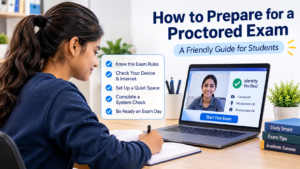
1. Understand What a Proctored Exam Is
A proctored exam is an assessment supervised to help maintain academic integrity and ensure that every student completes the exam fairly.
In an online proctored exam, monitoring may take place through automated technology, a live human proctor, or a record-and-review process, depending on the institution’s requirements.
Before your exam, your institution or instructor should explain the specific proctoring method being used.
You may be asked to:
- Verify your identity using a valid photo ID.
- Complete a selfie or face verification process.
- Allow access to your webcam and microphone.
- Show your testing environment through a room scan.
- Close unauthorized applications or browser tabs.
- Follow specific exam rules provided by your instructor.
Helpful tip: Read all exam instructions before test day. Knowing what to expect can help reduce unnecessary stress.
2. Check Your Device and Technical Requirements in Advance
One of the most important steps in preparing for an online proctored exam is checking your technology beforehand. A simple device check can help prevent last-minute problems.
Before exam day, make sure you have:
- A reliable laptop or desktop computer.
- A working webcam and microphone.
- A stable internet connection.
- A supported web browser.
- A fully charged laptop or access to a power supply.
- Any required proctoring software or browser extension installed.
If your institution uses a specific proctoring platform, follow its installation and system-check instructions carefully.
It is also a good idea to restart your computer before the exam and close unnecessary applications. This can help your device run more smoothly during the assessment.
Helpful tip: Complete any required system checks at least one day before your exam rather than waiting until the last minute.
3. Prepare a Quiet and Comfortable Testing Space
Your testing environment plays an important role in helping you stay focused during an online exam.
Choose a quiet, well-lit room where you can complete your assessment without interruptions. Make sure your surroundings meet the rules provided by your institution.
Here is a simple checklist:
- Select a private room with minimal background noise.
- Ensure your face is clearly visible to the webcam.
- Position your computer on a stable desk.
- Keep your testing area clean and organized.
- Remove unauthorized books, notes, phones, or other materials.
- Make sure the room has sufficient lighting.
- Inform family members or roommates that you will be taking an exam.
Some online proctored exams may require a room scan before you begin. This is a standard step in certain proctoring processes and helps confirm that your testing environment follows the exam guidelines.
Remember: Every institution has different exam policies. Always follow the specific instructions provided for your assessment.
4. Know What Happens During a Proctored Exam
Understanding the exam process can make your first experience much more comfortable.
Although the exact steps may vary depending on the proctoring platform, a typical online proctored exam follows this sequence:
Step 1: Log in to Your Exam
Open the exam link provided by your institution and sign in using your assigned credentials.
Step 2: Complete Identity Verification
You may be asked to show a valid photo ID and complete a selfie verification process to confirm your identity.
Step 3: Check Your Testing Environment
If required, complete a room scan using your webcam to show that your surroundings meet the exam requirements.
Step 4: Complete the Technical Checks
Allow the necessary webcam and microphone permissions. Follow any additional system checks displayed on the screen.
Step 5: Review the Exam Rules
Read the instructions carefully before starting. Pay attention to time limits, permitted materials, and restricted activities.
Step 6: Begin Your Exam
Once all required checks are complete, start your assessment and focus on answering the questions.
Step 7: Submit Your Answers
When you finish, submit your exam according to the instructions. Wait for the confirmation message before closing the browser or leaving the exam session.
5. Understand Common Proctoring Rules
Students sometimes worry about accidentally breaking an exam rule. The easiest way to avoid this is to understand the guidelines before starting.
Depending on your institution’s policies, you may be asked to:
- Keep your face visible throughout the exam.
- Avoid looking away from the screen unnecessarily.
- Refrain from communicating with other people.
- Avoid using unauthorized notes or devices.
- Keep your mobile phone away unless specifically permitted.
- Avoid opening additional browser tabs or applications.
- Stay within the approved testing environment.
Not every proctored exam follows the same rules. Some assessments allow calculators, reference materials, or specific applications. Others may restrict them.
If you are unsure whether something is permitted, ask your instructor before exam day.
6. What Should You Do If Something Goes Wrong?
Technical problems can happen, even when you prepare carefully. A temporary internet interruption, webcam issue, or software problem does not automatically mean your exam is lost.
Here are some common situations and practical steps to take:
Problem: Your webcam or microphone is not working.
Check whether the correct device is selected and whether your browser has permission to access it. Restart the browser if necessary.
Problem: Your internet connection becomes unstable.
Check your Wi-Fi connection and follow the recovery instructions provided by your institution or proctoring platform.
Problem: The proctoring software stops responding.
Avoid repeatedly refreshing the exam page unless instructed. Follow the official troubleshooting guidance or contact the support team.
Problem: Identity verification fails.
Make sure your ID is clearly visible, your room is well-lit, and your face is positioned correctly in front of the camera. Contact support if the issue continues.
Problem: You accidentally violate an exam instruction.
Stay calm and follow the instructions on your screen. If necessary, inform your instructor or proctor about what happened.
Important: Keep your institution’s exam support contact information available before starting. If a technical issue affects your assessment, report it as soon as possible.
7. How Instructors Can Help Students Prepare
Instructors also play an important role in making the first proctored exam a positive experience.
Students are more likely to feel confident when they understand the process and have access to clear instructions.
Instructors can support students by:
- Sharing exam guidelines well in advance.
- Explaining the proctoring process before test day.
- Providing system requirements and setup instructions.
- Offering a practice test or system compatibility check.
- Clearly explaining permitted and restricted materials.
- Sharing technical support contact information.
- Addressing student questions before the assessment begins.
A short preparation session or practice assessment can help students become familiar with the technology and avoid unnecessary confusion on exam day.
8. Frequently Asked Questions About Proctored Exams
Q1. Do I need a webcam for an online proctored exam?
In most webcam-based proctored exams, yes. A webcam may be required for identity verification and exam monitoring. However, requirements depend on the institution and the proctoring method.
Q2. Can I take a proctored exam from home?
Yes. Many online proctored exams allow students to complete assessments from home, provided they meet the technical and environmental requirements.
Q3. What happens if my internet disconnects during the exam?
Follow the platform’s recovery instructions and contact your institution or technical support team as soon as possible. The next steps depend on the exam settings and institutional policies.
Q4. Will someone watch me throughout the exam?
Not necessarily. Some exams use live human proctors, while others use automated monitoring or record-and-review methods. Your institution should explain which approach applies.
Q5. Can I use my phone during a proctored exam?
This depends on the exam rules. Most assessments restrict mobile phone use unless the instructor specifically permits it.
Q6. What should I do before starting my first proctored exam?
Check your device, test your internet connection, prepare your testing space, keep your identification ready, and review all exam instructions.
9. Make Your First Proctored Exam a Confident Experience
Your first proctored exam does not need to be stressful. Most challenges can be avoided by understanding the process, checking your technology, preparing your environment, and following the exam instructions.
For students, preparation means fewer surprises and more time to focus on the assessment. For instructors, providing clear guidance and technical support helps create a fairer and more comfortable testing experience.
With the right preparation and reliable online proctoring technology, institutions can support secure assessments while helping students approach their exams with confidence.
Explore Secure Online Exam Solutions with Proctortrack
Proctortrack helps educational institutions support secure online assessments through technology designed to protect academic integrity and simplify remote exam monitoring.
With options for automated proctoring, live proctoring, and record-and-review, institutions can select an approach that aligns with their assessment requirements.
Learn more about secure online assessment solutions at Proctortrack.
Subscribe for more insights on online exam security, academic integrity, and digital assessment practices.
Read Next: Explore more Proctortrack resources to learn how institutions can create secure, flexible, and student-friendly online examination experiences.